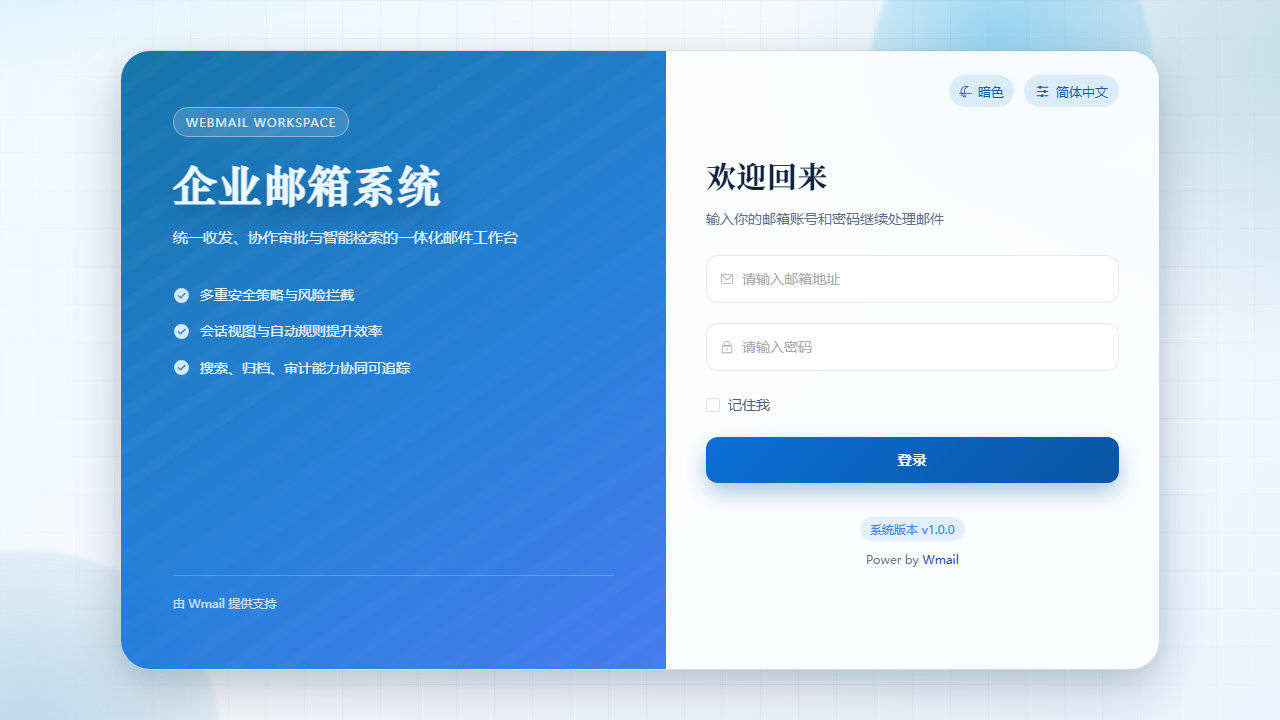
WMail Product Deep Dive

What kind of enterprise mail system is WMail?

It is not only a mail gateway and not only a Webmail frontend. WMail combines installation delivery, license activation, mail workspace, admin governance, and operational observability into one enterprise mail system.

ProtocolsSMTP / IMAP / POP3 / Webmail
GovernanceAccounts, roles, policies, audit
DeploymentPrivate deploy · licensing · domains

You get more than a mail frontend

WMail keeps mail access, admin control, license state, and rollout checks inside one product surface instead of scattering them across multiple tools.

Operable / Governable
WorkspaceMail, threads, search, settings
ConsoleAccounts, roles, policies, audit
EntitlementsQuotas, features, license state
Operations2FA, request logs, backup, recovery
Product Map

Full-stack Capability Overview

WMail brings protocol access, outbound relay, security compliance, capacity governance, and collaboration into one operable enterprise mail system.

01

Protocol & Delivery

SMTP/IMAP/POP3/Webmail cover day-to-day access, while SMTP relay centralizes outbound delivery for business systems and diagnostics.

  • Full-protocol access, SMTP relay, and unified account control
  • Tracking, conversation view, scheduled send, and delivery diagnostics
  • Rules and smart-folder auto classification
02

Security & Health

Identity control, content protection, runtime status, and troubleshooting signals live in the same admin surface to reduce incident handling cost.

  • SPF/DKIM/DMARC validation and anomaly blocking
  • Health checks, request logs, and key-metric alerts
  • Audit logs, traceability, and service control
03

Data Governance & Migration

Import/export, quota policy, storage thresholds, attachment limits, and historical data cleanup are handled together to prevent capacity drift after launch.

  • Import/export and bulk migration
  • Attachment, storage-threshold, and quota controls
  • Saved searches, historical lookup, and capacity-growth governance
System Boundary

Real Deployment Chain

The product page should explain not only what WMail does, but where each capability lives: ingress, security, mail service, governance console, data, and observability each have clear boundaries.

Access & Security Entry

Public site, admin console, and APIs pass through authentication, authorization, rate limiting, and audit boundaries

Mail Service & Policy Layer

Handles mail access, SMTP relay, rule orchestration, anti-spam, and risk detection

Data, Indexing & Backup Layer

Handles mail storage, attachments, search indexing, logs, backup recovery, and capacity governance

Collaboration & Integration Layer

Handles shared mailboxes, knowledge base, automation rules, webhooks, Feishu / Slack, and plugin extensions

Composition

What WMail is made of

This is not a single-page product. It is a combination of capabilities designed for long-term operation of enterprise mail.

Webmail Workspace

Handles everyday send/receive, threads, search, settings, and common collaboration entry points; shared mailboxes and AI support are confirmed by delivery scenario.

  • A unified place for end-user mail work
  • Mail workflow stays in one operational surface

Admin Console

Covers accounts, roles, policies, security, audit, and runtime state; SSO/LDAP is confirmed by delivery scenario.

  • Built for long-term IT administration
  • Permissions, identity, automation, and audit governance remain inside the system

Licensing & Entitlement Governance

Controls quota boundaries, authorized domains, and entitlement state instead of only recording purchases.

  • One-product licensing can be governed in-product
  • Permissions and capability boundaries stay explicit

Domain & Operations Governance

Builds long-term control around authorized domains, request logs, monitoring, service control, and recovery.

  • Domain and instance state remain traceable
  • Request logs, monitoring, service control, and backup recovery stay in one admin view
Workflow

Key workflows

From a buyer’s perspective, WMail solves the ongoing operation of an enterprise mail system rather than only the initial deployment.

01

Daily mail workflow

Bring mail, threads, search, rules, and follow-up entry points into a single workspace; advanced collaboration and AI are confirmed by scenario.

02

Audit and governance

Centralize 2FA, automation rules, permissions, logs, and risk protection in one admin surface; SSO/LDAP is confirmed by scenario.

03

Migration and onboarding

Evaluate account and historical-data migration, then confirm LDAP, webhooks, and surrounding-system integration by delivery scope.

04

AI under entitlement control

AI Assistant is not a side plugin. It is governed by entitlements, roles, and audit boundaries.

Product Evidence

Real product screens that show WMail without relying on abstract feature claims

Start with the real workspace, then review admin, entitlement, and operations screens to judge whether WMail is a single-purpose tool or a full enterprise mail system built for long-term operation.

Real Product Surface

Start with the main workspace and confirm that it is a real mail workspace, not a concept page

This is not a capability mockup. It is product evidence showing how WMail connects day-to-day mail work, search, navigation, and governance views in one system.

  • First confirm whether the daily mail and search surface feels complete enough.
  • Then confirm whether admin and governance views belong to the same product instead of stitched tools.
  • Finally confirm whether entitlement, backup, and audit capabilities are backed by real product screens.
Start with the main workspace and confirm that it is a real mail workspace, not a concept page
Workspace

Mail, search, and settings all live inside the real workspace

Start with the screens end users will open every day and judge whether this is a workspace they can actually operate long term.

WorkspaceTap or click to inspect details

Inbox and workspace overview

The main workspace keeps the mail list, reading view, and high-frequency actions together so daily efficiency can be judged directly.

WorkspaceTap or click to inspect details

Settings and personal configuration

WMail is not only a send/receive page. Common settings and personal working preferences are also kept inside the same product surface.

Collaboration

Navigation, shared knowledge, and common entry points feel closer to real team usage

This group shows whether teams can complete high-frequency work in one consistent entry and keep internal knowledge tied to the mail workflow.

CollaborationTap or click to inspect details

Navigation structure and high-frequency entry points

The side navigation and function layout show whether the product is organized around real work instead of spreading capabilities across separate systems.

CollaborationTap or click to inspect details

Shared knowledge base and AI Q&A

Policies, how-to guides, and question entry points live on the same screen, showing that knowledge capture can stay connected to daily mail work.

Admin Console

Security, audit, automation, integration, and extension are real admin pages, not just claims

These screens mainly serve admins and buyers. They answer whether the product can actually be governed after purchase and connected to existing systems.

Admin ConsoleTap or click to inspect details

Security settings and control surface

2FA, login policy, and SSO/LDAP controls live inside the admin product surface instead of depending on external scripts or ad-hoc documentation.

Admin ConsoleTap or click to inspect details

Audit view and traceability surface

You can see whether governance actions and audit records have dedicated views, which is critical for long-term operations.

Admin ConsoleTap or click to inspect details

Automation rules and policy orchestration

The automation rules screen shows that the admin console is more than a pile of settings. It is an execution surface for repeatable governance.

Admin ConsoleTap or click to inspect details

Integration configuration and event routing

The integration page keeps configs, event templates, and callback policies together so buyers can judge whether WMail fits existing directories, workflows, and surrounding systems.

Admin ConsoleTap or click to inspect details

Plugin marketplace and extension management

The plugin marketplace concentrates installable capabilities, version details, and enablement actions so extension paths feel formal rather than improvised.

Admin ConsoleTap or click to inspect details

Licensing governance and entitlement boundaries

Admins can review advanced capabilities, quota limits, and entitlement state directly inside the admin console instead of treating licensing as a separate large narrative block.

Operations

Backup, service control, anti-spam, and long-term operations have dedicated screens behind them

Finish with the operations, security, and recovery views to judge whether the system is built for ongoing governance instead of only the initial rollout.

OperationsTap or click to inspect details

Backup records and recovery preparation

Dedicated backup views show that long-term operations are handled by product surfaces rather than promises alone.

OperationsTap or click to inspect details

Recovery targets and follow-up handling

A dedicated recovery view makes it easier to judge whether rollback, exception handling, and recovery paths stay controllable.

OperationsTap or click to inspect details

Backup tasks and execution queue

The backup task view keeps schedules, state, and execution history together so buyers can judge whether operations remain manageable over time.

OperationsTap or click to inspect details

Maintenance tasks and system upkeep

A dedicated maintenance task surface shows that cleanup, upkeep, and batch operations are handled in-product instead of by long-term manual scripting.

OperationsTap or click to inspect details

Anti-spam policy and security interception

The anti-spam page brings switches, scan actions, and handling policies together so buyers can judge whether mail security can be operated continuously.

Capability

Capability matrix

This section is not a menu dump. It separates how users work every day, how admins govern the system, and how the deployment keeps operating after launch.

Workspace capabilities

What end users rely on every day.

  • Mail, threads, rules, scheduled send, and search
  • Follow-up, notifications, and common collaboration entry points
  • Shared mailboxes, AI summary, reply, and knowledge support are confirmed by delivery scenario

Admin governance capabilities

What administrators use to manage and troubleshoot the system.

  • Accounts, roles, org structure, 2FA, and login policy management
  • Audit logs, system state, plus scenario-based SSO / LDAP and email watermarking
  • SMTP relay, request logs, Prometheus monitoring, service control, and alert-driven troubleshooting

Migration and integration capabilities

How WMail fits into replacement and coexistence scenarios.

  • Bulk migration, email archiving, and historical-data governance evaluation
  • LDAP, webhooks, plugin-system extensions, Feishu / Slack integrations, and automation rules are confirmed by delivery scope
  • Unified access across complex domain structures

Advanced control capabilities

Best suited for organizations with higher control requirements.

  • Licensing can carry AI, knowledge base, email archiving, and watermarking boundaries inside the same product model
  • Storage, attachment, quota, and authorized-domain operations create a governance loop
  • Backup, service control, and long-term operations live beside daily admin work
Capability Focus

Full Product Capability Focus

WMail sells one product and is not split into Basic, Standard, or Enterprise feature tiers. This section explains capability scenarios buyers usually review before choosing a license term.

Access

Stabilize access, troubleshooting, and recovery first

Best for teams that already know they need third-party clients, a unified outbound channel, request tracing, capacity governance, and backup recovery.

  • SMTP/IMAP/POP3 and SMTP relay complete client access and system outbound delivery
  • 2FA, request logs, Prometheus monitoring, storage thresholds, and backup create the first operations loop
  • Best when the immediate goal is to stabilize protocol access, delivery diagnostics, capacity growth, and recovery paths
Governance

Turn collaboration, compliance, automation, and integration into one governance system

Best for organizations that have already moved into shared collaboration, compliance traceability, capacity quotas, multi-domain governance, and surrounding-system integration.

  • Shared mailbox, email archive, watermarking, SSO, and quota management can move into one product boundary
  • Automation rules, plugin system, and Feishu / Slack integrations are confirmed by delivery scope
  • Best for multi-team, multi-domain, long-running production environments
Intelligence

Bring unified directory auth, AI admin, and stronger security into one product boundary

Best for teams that have clearly decided they need LDAP/AD, stronger security controls, knowledge-base access, AI assistant, model configuration, and AI usage boundaries.

  • LDAP / AD, unified identity, and stronger security policies are governed together
  • AI summary, smart reply, knowledge-base entry, model configuration, and budget management become first-class capabilities instead of side add-ons
  • Best when intelligent workflows and org-level governance both need to live inside the formal product boundary
Deployment Governance

Deployment and governance model

WMail differentiates itself not only by features, but by how it is deployed, controlled, and maintained over time.

Private deployment

Fits teams that care about data boundary, rollout pace, and operational ownership.

  • Closer to enterprise control requirements
  • Long-term governance does not depend on scattered tools

License governance

One-product licensing, storage quotas, service control, and permissions can be managed from one entitlement model; AI and other advanced capabilities are confirmed by delivery scenario.

  • Protocol, collaboration, AI, integration, and operations capabilities are governed under one license model
  • Entitlement state, service control, and feature boundaries stay explicit and reviewable

Authorized domain operations

Connect domain, certificate, configuration, and entitlement relationships into a governance loop.

  • DNS validation, ownership checks, and Nginx config generation stay centered on authorized domains
  • Reduces drift and manual cross-system maintenance
Security Governance

Security & Governance

From identity boundaries and mail content safety to operational troubleshooting, the key controls are exposed as product surfaces.

Identity & Login Boundaries

TOTP-based two-factor auth, backup codes, IP restrictions, and SSO / LDAP integration keep authentication under one governance model.

Mail Threat Protection

Anti-spam, phishing detection, greylisting, encryption, and watermarking work together to reduce content risk.

Monitoring & Troubleshooting Surface

Prometheus metrics, health checks, alerts, request logs, and service control help admins investigate runtime problems directly.

Audit Trails & Recovery

Operational audit, email archiving, backup recovery, authorized-domain operations, and automation rules provide evidence for long-term governance.

Want to see the real environment before picking a plan?

Move from live demo to pricing at your own evaluation pace.